Kahoot vs Quizizz for teachers: which to use and when

For live, whole-class review sessions, start with Kahoot!. For homework assignments, self-paced practice, and per-student analytics, Quizizz is the stronger fit. Those two sentences cover roughly 80% of the decisions teachers actually face.
Here are the quick-pick recommendations by scenario:
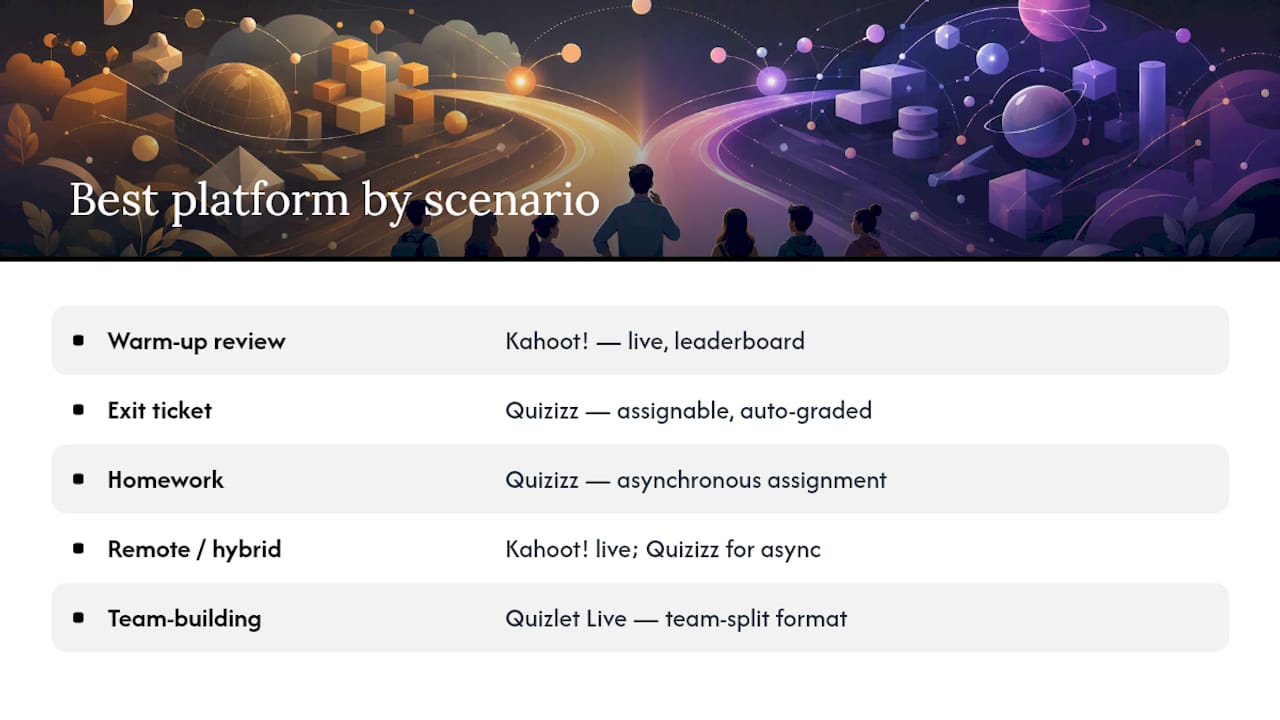
- Live warm-up or end-of-unit review (whole class, shared screen): Kahoot! — its countdown timer and real-time leaderboard create the energy that makes students actually pay attention.
- Homework or asynchronous formative check: Quizizz — students work at their own pace on their own devices, and you get per-student item-level data without chasing anyone.
- Corporate or remote training (meeting-style): Kahoot! for engagement spikes; Quizizz for post-session follow-up with auto-graded assignments.
- Team-building or collaborative vocabulary practice: Quizlet Live splits answers across teammates, which forces conversation rather than individual racing.
- Mixed-use (live + homework in one week): Quizizz handles both modes without switching platforms, though its live mode is less theatrical than Kahoot!'s.
One quick caveat: Kahoot!'s free tier caps participants at 40 per game on the basic plan, and some analytics features require a paid upgrade. Quizizz’s free tier is more generous for homework assignments, but advanced reporting and certain question types are also paywalled.
To pilot either platform in under a week: run one live session with Kahoot! on Monday using a pre-built public quiz, then assign the same content as a Quizizz homework set on Wednesday. Compare completion rates and the item-level data Quizizz surfaces. That single comparison tells you which format your students actually engage with.
Table of Contents
- How do Kahoot! and Quizizz compare side by side?
- How do these platforms actually behave in class?
- What does each platform cost, and what’s free?
- When should you choose Kahoot! vs Quizizz?
- How does each platform affect student attention and anxiety?
- What do U.S. teachers need to know about privacy and COPPA/FERPA?
- How do you choose? A practical decision checklist
- What support and training resources do these platforms offer?
- What customization and branding options does each platform offer?
- What engagement features go beyond standard quizzes?
- How reliable are these platforms during peak use?
- How do the content libraries compare?
- Key takeaways
- The case for starting with Quizizz, not Kahoot!
- Papersza: free past papers to pair with your quiz platform
- FAQ
- Sources and further reading
How do Kahoot! and Quizizz compare side by side?
G2 user reviews show Kahoot! scoring higher for gamification and real-time engagement, while Quizizz rates higher for ease of setup and certain analytics features. The table below maps all seven platforms across the dimensions teachers ask about most.
| Platform | Best for | Pacing | Game modes & question types | Analytics & reporting | Integrations | Pricing / free tier | Ease of setup | Student experience | Privacy & data |
|---|---|---|---|---|---|---|---|---|---|
| Kahoot! | Live whole-class review | Teacher-led, synchronous | Multiple choice, polls, puzzles, slides, word cloud; shared-screen countdown | Class-level results; per-question breakdown; limited per-student history on free | Google Classroom, Teams, Zoom, LMS via API | Free up to 40 participants; paid plans from ~$17/month (teacher) | Very fast; large public library | High excitement; competitive leaderboard | COPPA/FERPA compliant; data processed in EU |
| Quizizz | Homework, self-paced practice | Student-paced or teacher-led | Multiple choice, open-ended, fill-in, polls, reorder, video questions, math | Per-student item analysis; class reports; exportable; assignment history | Google Classroom, Teams, Canvas, Schoology | Free tier generous for assignments; paid from ~$20/month | Fast; strong template library | Lower anxiety; per-device play | COPPA/FERPA compliant; U.S. data processing |
| Blooket | Short game-style review | Teacher-led or solo | Multiple choice only; multiple mini-game overlays (Tower Defense, Gold Quest, etc.) | Basic class summary; limited item analysis | Google Classroom | Free; paid from ~$3/month | Moderate; game setup adds steps | Very high novelty; students love the mini-games | COPPA compliant; limited FERPA documentation |
| Gimkit | Longer strategy-driven review | Teacher-led | Multiple choice; in-game currency mechanics; multiple game modes | Basic class results | Google Classroom | Free (limited games/month); paid from ~$9.99/month | Moderate | High engagement for longer sessions | COPPA compliant |
| Quizlet Live | Team vocabulary practice | Teacher-led, synchronous | Matching, multiple choice; team-split answer format | Basic session results | Google Classroom | Free for basic; Quizlet Teacher from ~$35/year | Easy | Collaborative; reduces individual pressure | COPPA/FERPA compliant |
| Slides With Friends | Interactive presentations | Teacher-led, synchronous | Polls, word clouds, rankings, trivia embedded in slides | Basic aggregate results | Slide import (PowerPoint, Google Slides) | Free (limited responses); paid from ~$15/month | Easy for slide users | Familiar slide format; low friction | Standard privacy policy; check for K–12 use |
| TriviaMaker | Game-show style reviews | Teacher-led | Grid, List, Trivia, Wheel formats; multiple choice and open response | Minimal built-in reporting | None native | Free tier available; paid plans available | Moderate | Fun game-show feel; works well for small groups | Standard policy; verify for district use |
Quick best-for notes:
- Kahoot! — is the go-to for high-energy live sessions where the shared screen and countdown timer drive participation.
- Quizizz is the practical workhorse for asynchronous learning workflows: assign on Monday, auto-graded by Tuesday.
- Slides With Friends — fits trainers who already build decks and want to add interaction without rebuilding content.
- TriviaMaker — works well for small-class game-show moments and teachers who want flexible display formats.
How do these platforms actually behave in class?
Pacing and play modes
Kahoot! is built around the shared screen. Every student watches the same question, the same countdown, and the same leaderboard reveal. That synchronous rhythm is its superpower in a live classroom and its limitation everywhere else. Quizizz flips the model: each student sees questions on their own device at their own pace, which means a student who needs 45 seconds on a question doesn’t hold back the rest of the class.
Both platforms offer a teacher-paced live mode, but Quizizz’s self-paced assignment mode is where it genuinely separates from Kahoot!. You set a deadline, students complete it when they can, and the gradebook fills automatically. That workflow maps directly to how formative assessment works in practice: low-stakes, frequent checks that inform your next lesson without requiring everyone to be in the same room at the same time.
Question types and activity modes
Kahoot! supports multiple choice, polls, open-ended text (on paid plans), puzzles, and word clouds. Its slide-style content blocks let teachers embed explanatory slides between questions, which is useful for review sessions that need a bit of instruction mixed in.
Quizizz goes wider on question types: multiple choice, fill-in-the-blank, open-ended, polls, reorder/jumble, video questions, and equation support for math teachers. That last one matters more than it sounds. A math teacher running a formative check on algebra doesn’t want to photograph equations and upload images; native math input removes that friction entirely.
Blooket and Gimkit both use multiple choice as their core format but wrap it in game mechanics that change the feel entirely. Blooket’s Tower Defense mode, for instance, turns correct answers into defensive units. Students stop thinking about the quiz and start thinking about the game, which is either a feature or a bug depending on your learning objective.
Analytics and reporting
Quizizz’s reporting depth is a genuine differentiator. You get per-student item analysis, class-level summaries, assignment completion tracking, and exportable data. If you need to show a parent or administrator which specific concepts a student is struggling with, Quizizz gives you that evidence.
Kahoot! provides class-level results and per-question breakdowns, but per-student historical tracking is limited on the free plan. For a one-off review session, that’s fine. For ongoing formative assessment across a semester, it’s a real gap.
Integrations and LMS workflow
Quizizz integrates with Google Classroom, Microsoft Teams, Canvas, and Schoology, and it can push grades directly to a gradebook. Kahoot! connects with Google Classroom and Teams as well, but grade-sync depth varies by plan. Neither platform replaces a full LMS, but Quizizz gets closer to a gradebook-adjacent tool.
Pro Tip: Before your pilot, check whether your district’s LMS is on each platform’s integration list. A tool that syncs grades automatically saves 20–30 minutes per assignment cycle; one that doesn’t adds a manual export step that compounds across a semester.
Ease of use and teacher workflow
Kahoot! deploys fast. Search the public library, find a quiz on your topic, launch it in under two minutes. The authoring interface is clean and the template library is large. Quizizz’s authoring is slightly more involved because there are more question types to configure, but G2 users actually rate it higher for ease of setup overall, likely because the assignment workflow is more self-contained once you’re past the creation step.
What does each platform cost, and what’s free?
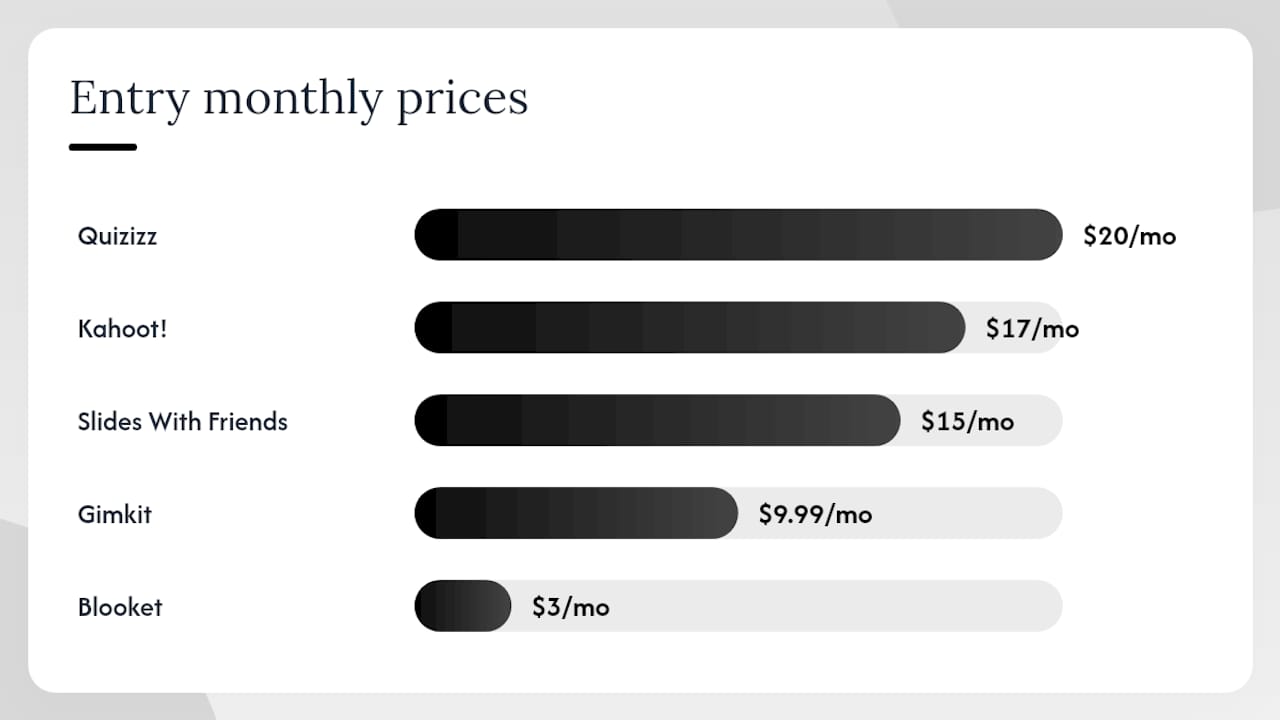
Pricing changes frequently; always verify current rates on vendor sites before procurement. The figures below reflect publicly available plan structures.
| Platform | Free tier limits | Entry paid plan (approx.) | Notable paywalled features |
|---|---|---|---|
| Kahoot! | Up to 40 participants/game; basic question types; limited reports | ~$17/month (teacher plan) | Open-ended questions, advanced reports, increased participant limits, integrations |
| Quizizz | Unlimited participants on assignments; core question types | ~$20/month (teacher plan) | Advanced analytics, AI question generation, some question types, priority support |
| Blooket | Limited hosted games/month; core modes | ~$3/month | Unlimited games, more modes, priority support |
| Gimkit | Limited games/month; basic modes | ~$9.99/month | Unlimited games, all modes, advanced features |
| Quizlet Live | Basic collaborative mode | ~$35/year (Quizlet Teacher) | Ad-free, advanced study modes, class management |
| Slides With Friends | Limited responses per session | ~$15/month | Unlimited responses, more interaction types |
| TriviaMaker | Basic game creation | Paid plans available | Advanced game formats, more players, branding |
Key pricing notes:
- Kahoot!'s 40-participant cap on the free plan is the most commonly cited friction point for teachers with larger classes. A standard U.S. high school class of 30 fits; a combined session or assembly does not.
- Quizizz’s free tier is notably more generous for homework-style use: unlimited participants on assigned activities, which is why many teachers use it for take-home practice without upgrading.
- Both Kahoot! and Quizizz offer school and district licensing, which typically reduces per-teacher cost significantly compared to individual subscriptions. District IT procurement teams should request a quote directly.
- Blooket’s paid plan is among the cheapest in this category, making it a low-risk upgrade for teachers who want to remove the monthly game cap.
- Free-tier generosity varies considerably across quiz platforms, and the market has shifted toward more generous free plans as competition has increased. Always test the free tier thoroughly before committing to a paid plan.
School and district purchasing options exist for both Kahoot! and Quizizz. Per-teacher pricing is the standard entry point; per-host pricing (where one license covers multiple sessions) is more relevant for corporate trainers running large cohorts. If your school is considering a district-wide rollout, both vendors offer volume licensing, and some state education consortia have negotiated rates worth checking before purchasing individually.
When should you choose Kahoot! vs Quizizz?
The right platform depends on what you’re actually trying to accomplish in a given lesson or training block.
Warm-up review (5–10 minutes, whole class): Kahoot! is purpose-built for this. Project the game PIN, students join on phones or laptops, and you’re running in under two minutes. The leaderboard keeps energy high. The limitation is that slower students can feel exposed when their score appears publicly, so consider enabling anonymous mode for classes where that’s a concern.
Exit ticket (end of class, individual accountability): Quizizz handles this better. Assign a short five-question set with a 24-hour window, and every student completes it on their own device after class. You see exactly who answered what, and the auto-grading means you’re looking at data, not marking papers, the next morning. This is formative assessment working as it should: low stakes, high feedback density.
Homework assignment: Quizizz is the clear choice. Its assignment window, deadline setting, and per-student reporting are designed for asynchronous use. Kahoot! doesn’t have a comparable homework workflow on its free plan.
Remote or hybrid training (corporate): Kahoot! works well in a Zoom or Teams meeting where the host shares their screen and participants join on a second device. The game-show energy translates surprisingly well to remote settings. For follow-up or pre-work, Quizizz’s self-paced mode handles the asynchronous piece.
Team-building event: Quizlet Live’s team-split format forces students to talk to each other to find the right answer, which no other platform on this list replicates. For a class that needs more collaboration and less individual competition, that’s a meaningful difference.
Pro Tip: For a one-week pilot, run Kahoot! live on Day 1 and assign the same content as a Quizizz homework set on Day 3. Track three things: completion rate, time-on-task, and one student comment per format. Those three data points will tell you more than any feature comparison chart.
Device requirements and low-bandwidth use: Both Kahoot! and Quizizz run in a browser and on iOS/Android apps, so they work on most school-issued devices. Kahoot! requires a stable connection for the shared-screen countdown to stay synchronized; a weak connection causes the timer to drift, which frustrates students. Quizizz’s self-paced mode is more forgiving of intermittent connectivity because students aren’t synchronized to a shared clock.
How does each platform affect student attention and anxiety?
The competitive leaderboard in Kahoot! is its most discussed feature and its most debated one. For students who are confident in the material, the countdown and public ranking are motivating. For students who struggle, seeing their name near the bottom of a public leaderboard after every question can shift the experience from formative practice to public embarrassment.
Quizizz’s per-device, self-paced model reduces that pressure considerably. Students see their own progress, not a class ranking in real time, which tends to produce more honest responses on formative checks. A student who doesn’t know the answer to a Kahoot! question will often guess quickly to avoid the appearance of hesitation; the same student on Quizizz is more likely to actually read the question.
Varied question types and low-stakes checks improve the quality of formative feedback precisely because students respond more honestly when the stakes feel lower. That’s an argument for Quizizz in any context where you want the data to reflect actual understanding rather than test-taking speed.
Accessibility considerations:
- Both platforms work on mobile browsers, which matters for students without laptops.
- Neither platform has full screen-reader support out of the box; teachers with visually impaired students should contact vendor accessibility teams before deploying.
- Kahoot!'s timed questions disadvantage students with processing differences; the timer can be extended or disabled on paid plans.
- Quizizz allows teachers to remove the leaderboard and adjust time limits per question, which covers most common accommodation needs.
Classroom accommodations teachers can apply:
- Disable the public leaderboard in Kahoot! (available in settings) to reduce social comparison pressure.
- Set extended time per question in Quizizz for students with IEPs or 504 plans.
- Use Quizlet Live’s team mode to pair stronger and weaker students, distributing the cognitive load.
- Assign Quizizz in practice mode (unlimited attempts, no grade recorded) before a graded attempt.
What do U.S. teachers need to know about privacy and COPPA/FERPA?
Both Kahoot! and Quizizz publish COPPA and FERPA compliance statements, but compliance claims from vendors are not the same as district approval. Before deploying either platform in a U.S. K–12 setting, the teacher or IT coordinator needs to verify a few specific things.
What COPPA and FERPA require in this context:
- COPPA applies to platforms collecting personal data from children under 13. If students create accounts, the platform must obtain verifiable parental consent or operate under a school-issued consent framework.
- FERPA protects student education records. Any platform that receives student names, grades, or performance data tied to identifiable students is handling education records and must operate under a FERPA-compliant data agreement with the school.
| Privacy dimension | What to check | Where to look |
|---|---|---|
| Data retention | How long is student data stored after account deletion? | Vendor privacy policy, DPA (Data Processing Agreement) |
| Third-party sharing | Is student data shared with advertisers or analytics partners? | Privacy policy “data sharing” section |
| Data location | Where are servers located? (EU vs. U.S. matters for some districts) | Privacy policy or vendor DPA |
| SSO / account type | Can students join without creating an account? | Vendor help docs; test with a guest join |
| Parental consent | Does the platform require parental consent for under-13 users? | COPPA section of privacy policy |
| Export and deletion | Can teachers export all student data and request deletion? | Privacy policy; contact vendor support |
Practical admin checklist before approving a pilot:
- Confirm the vendor has signed your district’s standard Data Processing Agreement or offers a comparable DPA.
- Check whether students can participate as guests (no account required). Both Kahoot! and Quizizz support guest/nickname-only joins for live sessions, which avoids account creation for minors.
- Verify that no student-identifiable data is shared with third-party ad networks.
- Confirm the teacher (not the student) controls data export and deletion.
For privacy-focused alternatives to mainstream quiz platforms, a growing number of tools are designed with data minimization as a core feature rather than an afterthought.
How do you choose? A practical decision checklist
Step 1: Define your primary use case. Is this for live class sessions, homework assignments, or both? If primarily live, Kahoot! is the faster path. If primarily homework or mixed, Quizizz is more flexible.
Step 2: Check your device environment. Do students have reliable internet during class? Do they have personal devices or school-issued ones? Kahoot!'s shared-screen model requires a projector or display; Quizizz’s per-device model requires individual devices.
Step 3: Confirm privacy approval. Before any student data touches a platform, confirm your district has approved it or that you’re using a guest-only mode that collects no identifiable data.
Step 4: Run a one-week pilot.
- Day 1: Run a live Kahoot! session. Note setup time, student engagement, and any technical issues.
- Day 3: Assign the same content as a Quizizz homework set. Note completion rate and the quality of the item-level data you receive.
- Day 5: Ask students two questions: “Which format helped you learn more?” and “Which felt fairer?”
- Review the data: completion rate, average score, and time-on-task for each format.
Step 5: Evaluate against your metrics. Target metrics for a one-week pilot: completion rate above 70%, average score that reflects genuine learning (not just guessing), and at least one actionable insight from the analytics (e.g., “75% of students missed question 4 on fractions”).
Red flags to stop a pilot early:
- Students cannot join without creating accounts and parental consent is not in place.
- The platform’s data export is locked behind a paid tier you haven’t purchased.
- Significant accessibility gaps affect a meaningful portion of your class.
- Unexpected per-user charges appear after the free trial period.
Vendor questions to ask during procurement:
- What is the maximum participant count on the free plan?
- Can grades sync directly to our LMS?
- What is your data retention policy for student accounts?
- Do you offer school or district pricing, and what does it include?
What support and training resources do these platforms offer?
Kahoot! and Quizizz both maintain help centers, tutorial video libraries, and community forums. Kahoot! has a dedicated educator community and runs webinars periodically; its help documentation is thorough and searchable. Quizizz offers a similar help center with step-by-step guides for common workflows like Google Classroom integration and assignment setup.
For new users, both platforms have enough self-serve documentation to get started without contacting support. Where they differ is in responsiveness: paid plan users on both platforms get priority support, while free-tier users rely on community forums and documentation. Blooket and Gimkit have smaller but active teacher communities on platforms like Reddit and Facebook, where peer support often fills the gap that formal documentation leaves.
Corporate trainers evaluating Kahoot! for workplace use will find dedicated business-tier documentation and onboarding resources, including templates designed for meetings and training sessions rather than classrooms.
What customization and branding options does each platform offer?
Kahoot! allows teachers to add images, videos, and custom backgrounds to quizzes. On paid plans, organizations can add logos and custom color schemes, which matters for corporate trainers who want branded training materials. The public quiz library means you can also remix existing content rather than building from scratch.
Quizizz offers similar image and video embedding, and its paid plans include options for custom themes. Its meme generator feature lets teachers add humorous feedback images to correct and incorrect answers, which students tend to enjoy more than a plain “correct” notification.
Blooket and Gimkit offer minimal branding customization; the game aesthetic is fixed by the platform. TriviaMaker gives more control over the visual presentation of game boards, which is useful for teachers who want a specific game-show look. Slides With Friends is the most flexible for presentation-style customization because it works within existing slide decks.
What engagement features go beyond standard quizzes?
Kahoot! added discussion prompts and open-ended word cloud questions that work well for opinion gathering or brainstorming at the start of a lesson. Its team mode splits the class into groups that collaborate on answers, which changes the dynamic from individual competition to group strategy.
Quizizz introduced “Lessons” mode, which lets teachers embed instructional slides between questions. This turns a quiz into a guided review session where students read content, answer a question, get feedback, and move on. It’s closer to a self-paced lesson than a traditional quiz, and it’s available on the free plan.
Quizlet Live’s core mechanic is inherently collaborative: the platform splits the answer choices across teammates, so no single student can answer alone. That forces discussion in a way that standard quiz formats don’t.
Gimkit’s in-game currency system adds a strategy layer that extends engagement beyond the quiz itself. Students earn currency for correct answers and spend it on in-game upgrades, which means a student who falls behind on points can still influence the game through strategic spending.
How reliable are these platforms during peak use?
Both Kahoot! and Quizizz are used by millions of teachers globally, and both have experienced occasional outages during high-demand periods like the start of the school year or major exam seasons. Kahoot! in particular has faced reported slowdowns during peak times, which is worth noting for teachers planning high-stakes review sessions.
Quizizz’s self-paced model is somewhat more resilient to server load because students aren’t all hitting the platform simultaneously in the same synchronized burst. A Kahoot! live session with 35 students all submitting answers in a 10-second window creates a different load pattern than 35 students working through a Quizizz assignment over 20 minutes.
For critical sessions, have a backup plan: a printed version of the questions, or a simple Google Form, takes five minutes to prepare and removes the risk of a platform outage derailing a lesson.
How do the content libraries compare?
Kahoot! has one of the largest public quiz libraries in the category, with millions of teacher-created quizzes covering virtually every subject and grade level. The search function is decent, and filtering by grade, subject, and language helps narrow results. Quality varies considerably, so previewing a quiz before launching it live is worth the two minutes it takes.
Quizizz has a similarly large public library and adds AI-assisted question generation on paid plans, which can accelerate quiz creation from a text passage or topic prompt. Its library search is comparable to Kahoot!'s in scope.
Quizlet’s content library is the largest of any platform in this comparison, built over years of student-created flashcard sets that can be converted into Live activities. For vocabulary-heavy subjects, that depth is hard to match.
One licensing note: when reusing or adapting third-party question banks, check the licensing terms. Some vendor content is available under Creative Commons licenses for educational use; other content is proprietary and cannot be modified or redistributed. This matters most when teachers are building on existing public quizzes rather than creating from scratch.
Key takeaways
Kahoot! wins for live, high-energy sessions; Quizizz wins for homework, analytics, and self-paced formative checks. Run a one-week pilot with both before committing to either.
| Point | Details |
|---|---|
| Live vs self-paced split | Use Kahoot! for synchronous class sessions and Quizizz for homework assignments and ongoing formative checks. |
| Analytics depth matters | Quizizz provides per-student item analysis and exportable data; Kahoot! offers class-level summaries with limited per-student history on free plans. |
| Free tier limits | Kahoot!'s free plan caps live sessions at 40 participants; Quizizz’s free tier is more generous for assigned, self-paced activities. |
| Privacy check first | Confirm district approval and use guest-join modes to avoid account creation for students under 13 before any pilot. |
| Papersza for practice materials | Papersza offers free access to official past exam papers and memos, which teachers can assign alongside quiz platforms to support structured exam preparation. |
The case for starting with Quizizz, not Kahoot!
The conventional wisdom in edtech is that Kahoot! is the obvious starting point because it’s the most recognizable name. That’s worth questioning.
Kahoot! is genuinely excellent at one thing: creating a shared, high-energy moment in a room where everyone is watching the same screen. But that use case is narrower than it appears. It requires a projector, a reliable connection, and a class that’s physically together. It produces class-level data, not student-level data. And the competitive leaderboard, which is the feature teachers most often cite as engaging, is also the feature most likely to discourage the students who most need formative feedback.
Quizizz is less theatrical, but it’s more useful across a wider range of teaching contexts. The self-paced model means it works for homework, for differentiated instruction, for students who need more time, and for remote learners. The per-student analytics mean you’re making instructional decisions based on actual evidence rather than a show of hands.
The real argument for starting with Quizizz isn’t that it’s better in every situation. It’s that it covers more situations without requiring you to switch tools. You can still run a live session in Quizizz when you want the competitive energy. You just also have a homework workflow, a reporting dashboard, and a question bank that works for the other four days of the week.
For teachers who want both formats, the practical answer is to use Quizizz as the default and pull out Kahoot! for the specific moments where the game-show energy is the point, not a side effect.
Papersza: free past papers to pair with your quiz platform
Kahoot!, Quizizz, Blooket, and the rest are strong tools for in-class engagement. What they don’t provide is the structured, curriculum-aligned practice material students need when preparing for formal assessments.
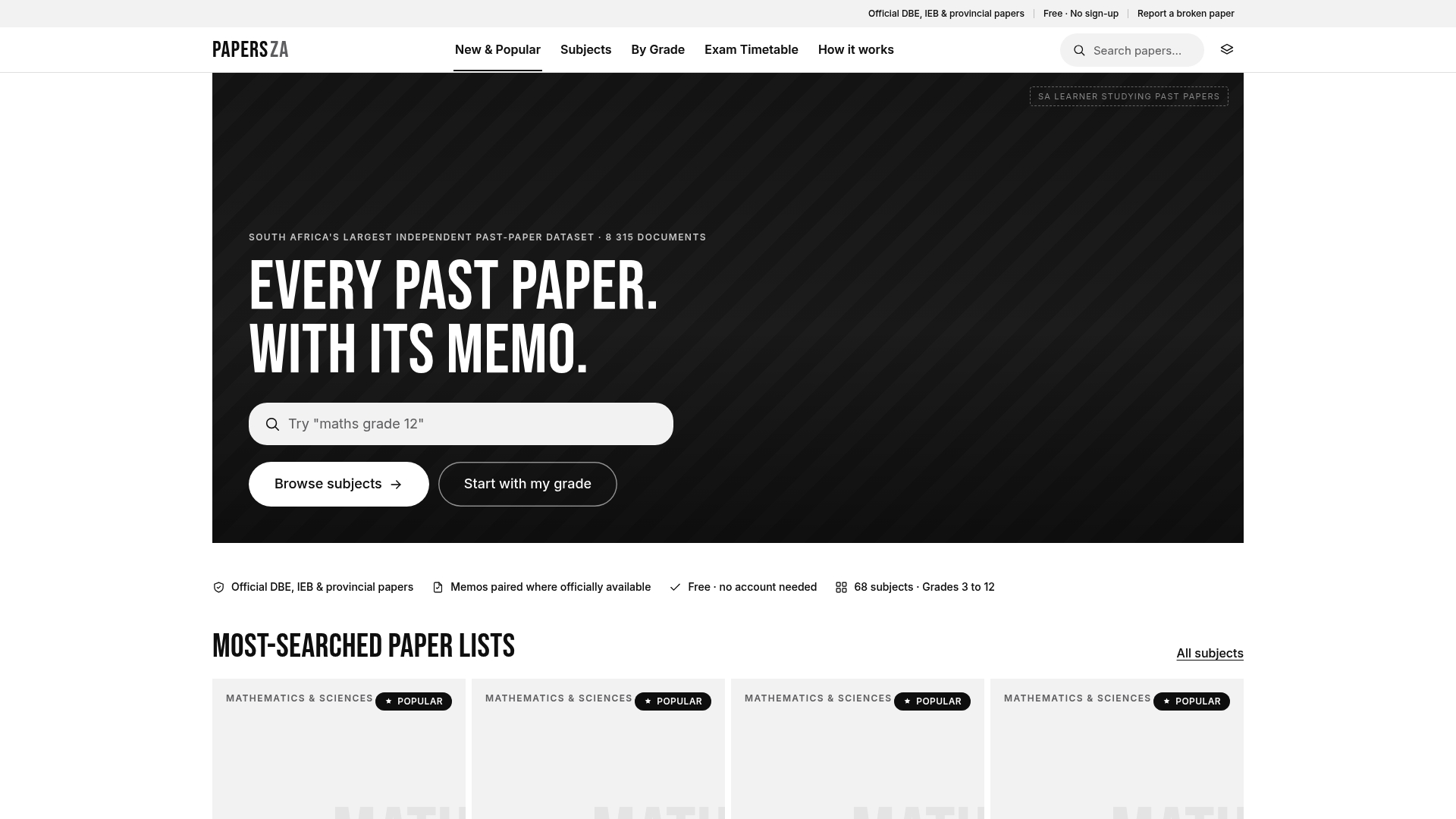
Papersza is South Africa’s largest free library of official past exam papers and marking memos, covering grades 3 to 12 across DBE, IEB, and provincial papers. No account required, no subscription, no paywall. Teachers can assign a Quizizz homework set on Monday to check understanding, then point students to the relevant past papers and memos on Papersza for deeper exam-style practice the same week. The two approaches complement each other: quiz platforms build engagement and surface gaps; past papers build the exam stamina and familiarity with question formats that actually move scores. Browse the full collection at papersza.co.za and find the papers your students need today.
FAQ
What is better, Kahoot! or Quizizz?
It depends on your use case. Kahoot! is better for live, teacher-led sessions where shared-screen competition drives engagement. Quizizz is better for homework assignments, self-paced practice, and situations where per-student analytics matter.
What are the disadvantages of Kahoot!?
Kahoot!'s main limitations are its 40-participant cap on the free plan, limited per-student reporting on free tiers, and a competitive leaderboard that can discourage lower-performing students. It also requires a shared screen and reliable connection for the live format to work well.
Is Quizizz completely free?
Quizizz has a free tier that covers core features including broad participant access on assigned activities and basic question types. Advanced analytics, AI question generation, and some question types require a paid plan with moderate subscription cost.
Is Kahoot! free anymore?
Kahoot! still offers a free plan, but it limits live sessions to a set maximum and restricts access to advanced question types and detailed per-student reports. Paid teacher plans unlock higher participant limits, open-ended questions, and deeper analytics.
Can I use both Kahoot! and Quizizz in the same class?
Yes, and many teachers do. A common workflow is to use Kahoot! for live warm-ups or end-of-unit reviews and Quizizz for homework assignments and formative checks. The two platforms serve different moments in the instructional cycle rather than competing directly.
Sources and further reading
- Compare Kahoot! vs. Quizizz | G2
- Kahoot! | Learning games | Make learning awesome!
- Kahoot vs Quizizz: Which Is Better in 2026? (+ Free Alternative)
- Kahoot Versus Quizizz | IconEra
- What Is Better Kahoot Or Quizizz? | LingoBright
- Teacherbot - The free alternative to Kahoot, powered by AI
- 14 examples of formative assessment (PCE San Diego)
- What is asynchronous learning | Coursera
This article provides general information about educational technology platforms. It is not legal or compliance advice. Confirm current privacy policies, pricing, and district approval requirements directly with vendors and your school’s IT or legal team before deploying any platform with student data.